

Why Choose Prevision Indoor Fixed LED Displays
- Factory-direct supply of cabinets, control equipment and spare modules.
- Module burn-in and assembled-screen testing before shipment.
- Colour calibration across the assembled screen for consistent images.
- Installation drawings and remote support for control software setup.

An Indoor Fixed LED Display for Your Space
An indoor fixed LED display is a modular video wall installed permanently in one location. Prevision MA, MB, MC, MN, MT and MX Series offer different cabinet formats for presentations, advertising and venue information.
Start with the nearest viewer, available wall area and maintenance access. A meeting room needs enough pixels for documents; a large advertising wall may prioritise screen area and bold content. The tables below compare cabinet layouts and native resolution.
Send your opening dimensions, site photos and a sample of the content. We can recommend a screen layout and identify the control equipment, mounting space and service access it needs.
Indoor Fixed LED Display Installation Options
Choose the structure around the building and the access your maintenance team will have.
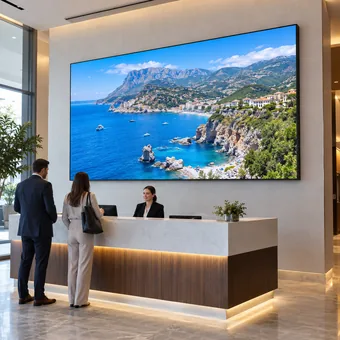
Mount cabinets on a support frame fixed to a suitable wall. Select front service where there is no access behind the screen.
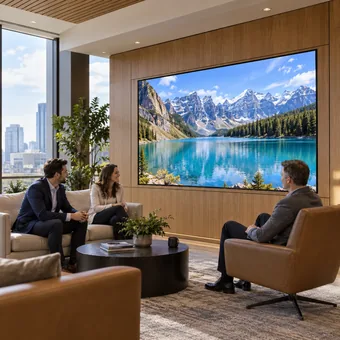
Fit the screen within a finished opening. Use an accessible front-service configuration and removable trim so future repairs do not require cutting the decoration.
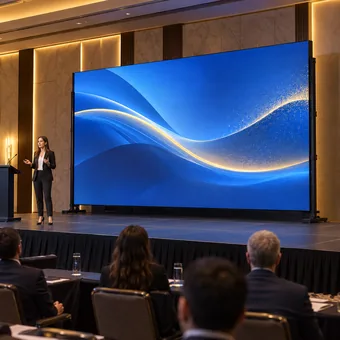
Use a floor-supported frame when the wall cannot carry the display. This suits permanent stages, foyers and exhibition spaces with suitable floor support.
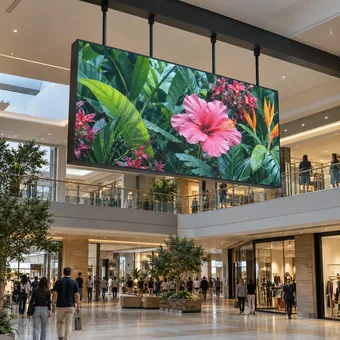
Suspend the display above a public area when floor space must stay clear. The overhead structure and maintenance access must suit the selected cabinets.
Indoor Fixed LED Display For Your Applications
Use an indoor fixed LED display where the screen will remain in place. Match its resolution, mounting position and video inputs to the room’s daily use.

Present spreadsheets and drawings on a permanently mounted screen. Choose the pixel pitch for the smallest text at the nearest seats, and connect the meeting-room computer through a compatible processor.

Install one backdrop for conferences, weddings and banquets. Your team can change event content between bookings while the cabinets, wiring and mounting structure stay in place.

Mount the screen above shelving or behind a service counter to keep floor space clear. A compatible scheduled player can change promotions throughout the day without staff reconnecting a computer.

Build the display into a permanent feature wall for product films and close-up images. Set the output under the showroom lighting so the screen complements the surrounding merchandise.

Place the screen where every seating section has a clear view. Set text size for the back rows and select processor inputs for the lectern computer and any live camera feed.

Fit a permanent display into the exhibition wall for timelines, maps and archive video. Match the content to its actual pixel dimensions so labels remain readable and images are not stretched.
Indoor Fixed LED Display Advantages

Modular LED cabinets form a display without the bezel grid of an LCD wall, keeping diagrams and large product images continuous.

MA cabinets weigh 4.2 kg each and MB cabinets weigh 5.4 kg. Their die cast aluminium construction helps with lifting and alignment during installation.

MA and MB use fanless aluminium housings for heat dissipation, avoiding cabinet fan noise near meeting-room seats. Leave the ventilation space required by the installation design.

Lower the output for evening presentations or raise it for brighter indoor lighting. Automatic adjustment is available with a compatible sensor and controller.

MT offers 1,000, 750 and 500 mm widths at a 250 mm height. MX supports mixed cabinet sizes and 90-degree corners for columns and shaped displays.

The stated LED display lifespan exceeds 100,000 hours. Operating temperature, brightness and maintenance affect service life; replaceable components may need attention sooner.
Front Service for an Indoor Fixed LED Display
The Prevision MC Series indoor fixed LED display provides front access to modules, power supplies and receiving cards. You can service the screen without a rear maintenance aisle. Keep the module removal path clear of permanent trim so repairs do not require dismantling the surrounding wall finish.

Indoor Fixed LED Display Control Options
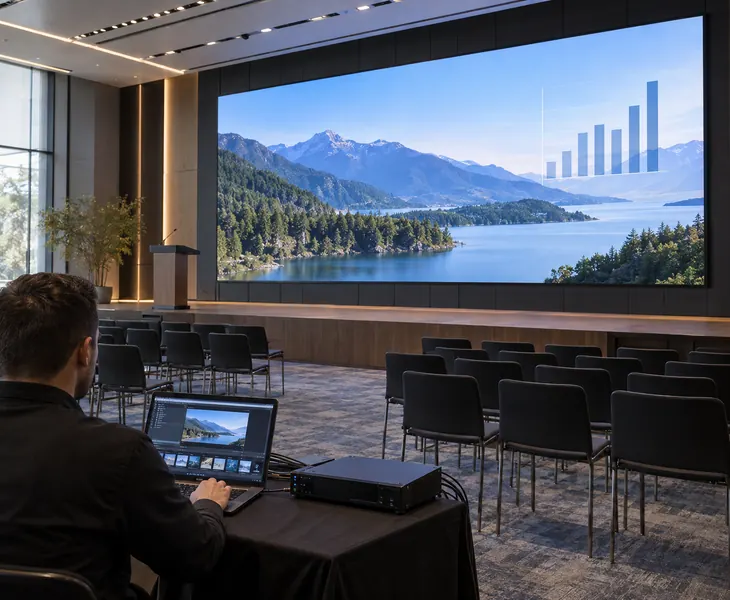
Run scheduled advertising on a Prevision indoor fixed LED display through a media player, or connect a video processor for presentations and live inputs. If your venue needs both, choose a control system that supports both playback modes. Your staff can switch content sources without changing the installed screen.
Prevision Indoor Fixed LED Display Installation Cases

A corporate headquarters in Riga, Latvia needed a permanent Indoor Fixed LED Display for its main lobby. The customer wanted to replace static printed branding with a large digital screen that could display company videos, visitor information, announcements, and promotional content. Prevision configured a P2.5 Indoor Fixed LED Display measuring 6.4 × 3.84 meters, with a resolution of 2560 × 1536 pixels. The seamless LED wall provides a large digital communication platform while allowing the customer to update different types of content without repeatedly replacing printed materials.

A shopping mall in Cairo, Egypt required a large Indoor Fixed LED Wall for promotions and tenant advertising. The installation area had limited space behind the display, so maintenance access was an important concern. Prevision configured a P3.076 Indoor LED Display measuring 7.68 × 3.84 meters, with a resolution of 2496 × 1248 pixels. A front-service configuration allows maintenance from the display side, while the large LED wall provides a permanent digital platform for shopping campaigns and promotional videos.

A flagship retail store in Bogotá, Colombia wanted a high-resolution digital wall for product launches, promotional videos, and seasonal campaigns. Customers could stand relatively close to the display, so image detail was more important than simply increasing screen size. Prevision provided a P2 Indoor Fixed LED Display measuring 5.12 × 2.88 meters, with a resolution of 2560 × 1440 pixels. The fine pixel pitch provides clear product imagery and text while maintaining a seamless large-format presentation.

A university in Ljubljana, Slovenia needed a permanent Indoor LED Video Wall for presentations, diagrams, lecture videos, and detailed educational content. The existing projection system lost contrast when classroom lighting remained on. Prevision configured a P1.25 Indoor Fixed LED Display measuring 4.8 × 2.7 meters, achieving a native 3840 × 2160 4K resolution. The fine pixel pitch makes small text and detailed graphics easier to read from closer seats while eliminating dependence on a dark projection environment.

A hotel in Muscat, Oman needed a permanent large-format LED screen for conferences, weddings, corporate events, and hotel presentations. Temporary rental screens required repeated setup and dismantling for different events. Prevision configured a P3 Indoor Fixed LED Screen measuring 7.68 × 4.32 meters, with a resolution of 2560 × 1440 pixels. The permanent installation gives the hotel a reusable visual system for presentations, videos, event branding, and live content.
Indoor Fixed LED Display Specifications and Selection
- Cabinet Formats
- Cabinet Count & Weight
- Pitch, Brightness & Refresh
- Native Full HD & 4K
- Front vs Rear Service
- Viewing Distance
Compare the standard cabinet formats below. Weights are per cabinet; depth excludes mounting hardware and site clearances. Alternative sizes are available within the relevant series.
| Series | Cabinet W × H × D (mm) | Weight (kg/cabinet) | Selection focus |
|---|---|---|---|
| MA | 600 × 337.5 × 32.5 | 4.2 | 16:9 cabinet format |
| MB | 640 × 480 × 62 | 5.4 | Alternative cabinet sizes |
| MC | 600 × 337.5 × 32.5 | 4.2 | COB for close viewing |
| MN | 960 × 960 × 75 | 35 | Large square cabinet format |
| MT | 1,000 × 250 × 20.6 | 4.8 | Slim strips and double-sided layouts |
| MX | 500 × 500 × 51 | 6.5 ± 0.1 | Mixed sizes and 90-degree corners |
Cabinet Count and Weight for a 7.68 × 3.84 m Wall
| Cabinet option | Columns × rows | Cabinet count | Cabinets only (kg) |
|---|---|---|---|
| MB 640 × 480 mm | 12 × 8 | 96 | 518.4 |
| MN 960 × 960 mm | 8 × 4 | 32 | 1,120 |
Both layouts cover the same active area. MN uses fewer cabinets, while this MB configuration has a lower total cabinet weight. Allow separately for frames, trim and external equipment. This calculation compares physical layouts, not resolution or installed cost.
Pixel Pitch, Brightness and Refresh Options
| Series | Listed pitch range (mm) | Rated brightness (nits) | Refresh options (Hz) |
|---|---|---|---|
| MA | 0.93–2.5 | 800–1,000 | 3,840 |
| MB | 1.25–4 | 800–1,000 | 1,920 / 3,840 / 7,680 |
| MC | 0.93–1.875 | 650–800 | 7,680 |
| MN | 1.86–5 | 800–1,000 | 1,920 / 3,840 |
| MT | 1.56–3.91 | ≥600 | 3,840 / 7,680 |
| MX | 1.25–2.97 | 600–700 | ≥3,840 |
Pitch ranges cover discrete models, not every intermediate pitch. Refresh options depend on the supplied configuration. The MC configuration shown uses flip-chip COB and 10,000:1 contrast. Brightness figures describe rated output, not the minimum dimming level.
MC Pixel Pitch and Native Full HD or 4K Size
These active display dimensions use complete 600 × 337.5 mm MC cabinets. Choose the resolution that fits your wall, then allow separately for the support frame and finishing.
| Exact pitch (mm) | Full HD 1920 × 1080 | UHD 4K 3840 × 2160 |
|---|---|---|
| 0.9375 | 1.8 × 1.0125 m | 3.6 × 2.025 m |
| 1.25 | 2.4 × 1.35 m | 4.8 × 2.7 m |
| 1.5625 | 3 × 1.6875 m | 6 × 3.375 m |
| 1.875 | 3.6 × 2.025 m | 7.2 × 4.05 m |
Full HD means 1920 × 1080 pixels; UHD 4K means 3840 × 2160. Accepting a 4K input does not make a lower-resolution wall native 4K. These are calculated layouts, not installation cases.
Front Service or Rear Service for a Fixed LED Wall
| Consideration | Front service configuration | Rear service configuration |
|---|---|---|
| Best site fit | Recessed screens and walls with no rear passage. | Screens with a permanent, accessible rear passage. |
| Repair approach | Remove components from the room side. | Reach service components from behind the display. |
| Space to reserve | Clear space in front for removal tools and components. | A usable working passage and access route behind. |
| Confirm before ordering | Front access to modules, power supplies and receiving cards. | Rear doors, connectors and replacement paths remain accessible. |
Choose the actual service configuration before finishing the wall. Front-removable modules alone do not prove that the power supplies and receiving cards are also front accessible.
Pixel Pitch and Viewing Distance Reference
| Exact pitch (mm) | Reference distance band (m) |
|---|---|
| 0.9375 | 1.6–3.2 |
| 1.25 | 2.2–4.3 |
| 1.5625 | 2.7–5.4 |
| 1.875 | 3.2–6.4 |
| 2.5 | 4.3–8.6 |
| 4 | 6.9–13.8 |
Bands run from an estimated average comfortable distance to a 20/20 visual-acuity reference, using Planar’s method. They are not minimum and maximum viewing limits. Check small text from the intended seats. P2.5 and P4 are general planning references; confirm the supplied model.
Customer Reviews
The Indoor Fixed LED Display gives our lobby a much more professional look. We can update company videos, visitor information, and announcements without replacing printed materials.
Kristaps OzolsThe Indoor LED Wall works very well for our shopping mall promotions. Front maintenance is especially useful because there is very little service space behind the screen.
Omar El-SayedThe P2 Indoor Fixed LED Display provides excellent detail for product videos and promotional content. The image remains clear even when customers stand close to the screen.
Santiago HerreraThe 4K Indoor LED Display is much clearer than our previous projection system. Text, diagrams, and videos remain easy to see even when the lecture hall lights are on.
Matej KovačThe Indoor Fixed LED Screen has reduced the need to bring in rental displays for every event. We now use one permanent screen for conferences, weddings, and corporate presentations.
Ahmed Al Balushi
Installation has four main stages:
- Measure the wall and mark cabinet positions using the installation drawing.
- Prepare a level fixing surface or install and level the support frame.
- Fit and align the cabinets, then connect power and signal cables.
- Map the screen in the control software and test colour, brightness and each video input.
We supply installation drawings and guide your installer through screen setup remotely.
For a 4.8 × 2.7 m native 4K screen, choose MC1.25. At 6 × 3.375 m, choose MC1.56; at 7.2 × 4.05 m, choose MC1.87. A smaller pixel pitch fits more detail into the same wall area. Use the viewing-distance table to check seating suitability.
Yes. We select a cabinet layout that fits inside the opening. Standard MC cabinets are 600 mm wide and 337.5 mm high; other series offer different sizes. We confirm the actual display dimensions and surrounding clearances before production. Fixed cabinets are not cut down to fit an arbitrary opening.
MA and MC cabinets are 32.5 mm deep. On a flat, suitable mounting surface such as a timber backing panel, they can be fixed directly, so the screen projects 32.5 mm from that surface. Any additional wall lining or support structure adds to the overall depth.
Choose MC Series COB where the screen is within reach and accidental contact is a concern; its encapsulated surface protects the LEDs. MA and MB SMD are suitable for general indoor displays mounted out of reach. At the same screen size and pixel pitch, both have the same pixel count.
Yes. Connect your computer to the video processor via HDMI. For a camera, use HDMI or select a processor with an SDI input. If you need to show several sources at once, choose a processor with enough inputs and display windows. Its output capacity must cover the screen’s full pixel count.
Our standard spare-parts allocation is 2%–3%, with at least one LED module, one power supply and one receiving card for small orders. You can replace a faulty component on site instead of waiting for a replacement shipment.
The screen comes with a three-year warranty. If an LED module develops a quality fault during normal use within this period, we repair it free of charge. You cover the associated shipping costs.
Send the screen width and height, nearest viewing distance, installation photos and the devices you want to connect. Include the delivery country and whether rear access is available. We use these details to select the pixel pitch, cabinet layout and control equipment, then prepare the equipment list and quotation.
Related Products
Choose a finer pixel pitch for meeting rooms and control rooms where small text must remain readable within a limited wall area.
Choose an encapsulated display surface for showrooms and other accessible installations where accidental contact is a concern.
Compare cabinet formats and front or rear service options for a modular video wall sized to your installation.
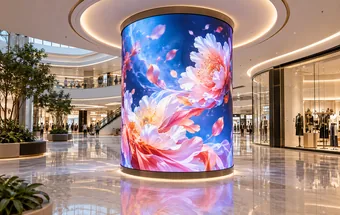
Wrap columns or follow curved interior walls with bendable LED modules mounted on a matching support structure.
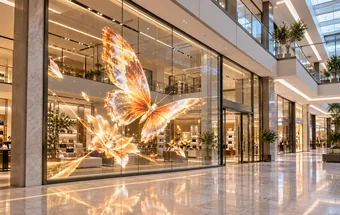
Turn existing shopfront or lobby glass into an advertising display while keeping products and interior spaces visible behind it.